
 15
15presentation
Indie Magazine Startup Pitch Deck
Shape your publishing concept with an indie magazine startup pitch deck featuring pastel gradients, bold collage layouts, and editable planning slides.
Google SlidesPowerPoint
presentation · English
Build clear, colorful reports with visual analytics slides designed for business updates, research findings, market trends, and project presentations.

Design notes
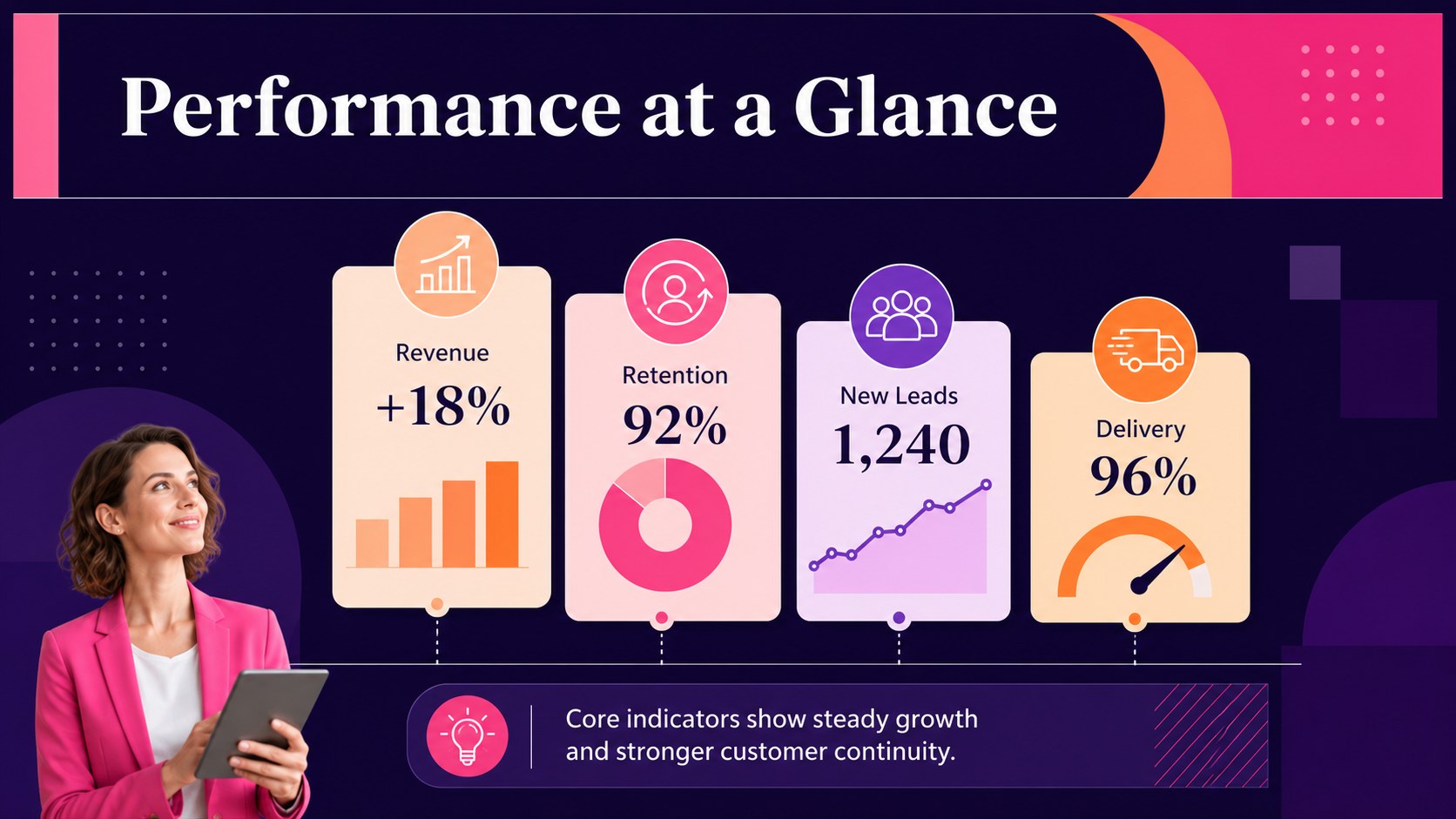
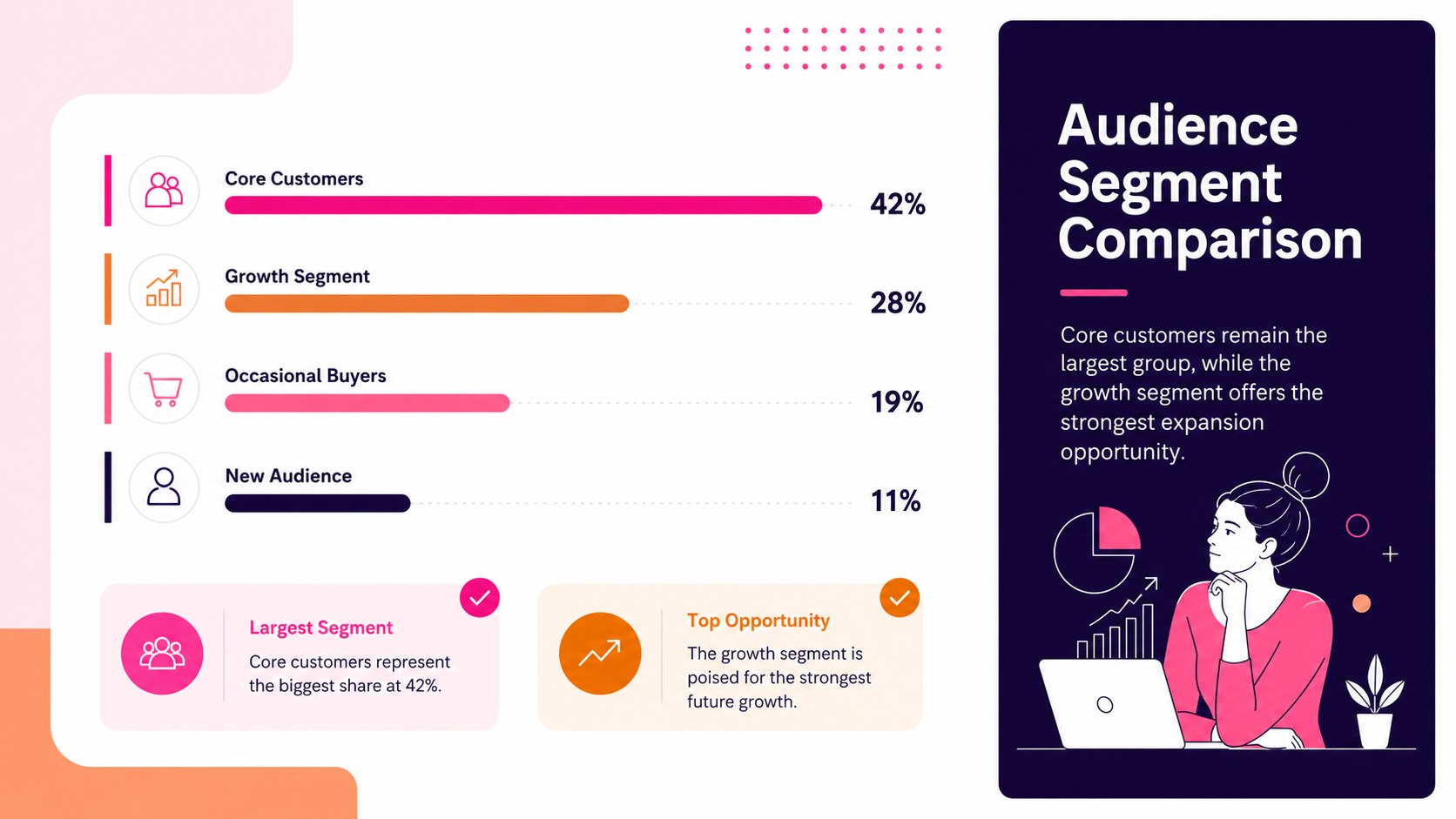
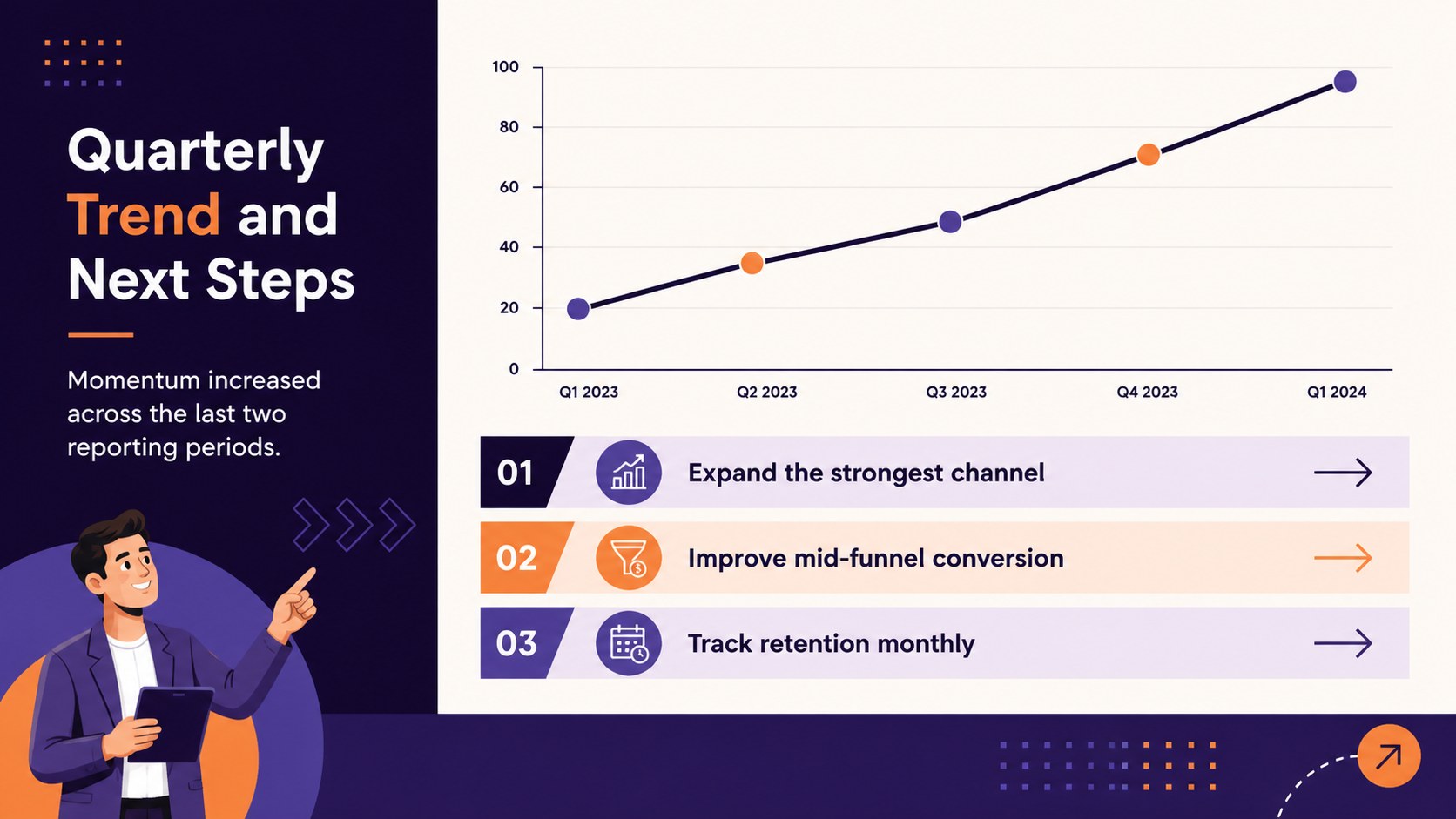
Visual analytics slides help you turn numbers, comparisons, and research findings into a focused story your audience can understand quickly. With a bright, modern palette and clean typography, this presentation set balances professional structure with approachable visual details. Use it to explain performance, highlight patterns, or support decisions without overwhelming viewers with dense tables.
Inside, you will find four coordinated layouts for introducing a report, summarizing key metrics, comparing categories, and presenting trends over time. Adapt the charts, labels, shapes, and color accents to create a business report infographic deck that matches your organization or project. The spacious compositions also work well as editable KPI presentation slides for recurring team reviews.
This template is suited to analysts, managers, consultants, educators, researchers, and project leads. It can support quarterly performance meetings, stakeholder briefings, classroom research summaries, campaign recaps, and market studies. Teams can also use it as a market research visualization template when presenting audience segments, survey results, or competitive findings.
Built for PowerPoint and Google Slides, every page is easy to revise with your own figures, headings, and brand colors. Duplicate layouts, reorder sections, or simplify individual graphics to fit anything from a short update to a detailed reporting session.
Perfect for: quarterly performance review; market research briefing; project metrics update; campaign results recap; stakeholder analytics report.
Frequently asked questions
Practical details
Yes. Replace the sample values, labels, headings, and chart elements with your own information. Colors and shapes can also be adjusted to match an existing report or visual identity.
The template is designed for PowerPoint and Google Slides. Some fonts or transitions may display slightly differently between platforms, so review the final deck before presenting.
Yes. Update the accent colors, text styles, and backgrounds using the theme controls in your presentation software. Keep strong contrast between labels and chart elements to preserve readability.
Yes. Duplicate the layouts and replace the metrics for monthly, quarterly, or annual reporting. The modular design supports both short executive updates and longer analytical presentations.
Keep exploring
15Shape your publishing concept with an indie magazine startup pitch deck featuring pastel gradients, bold collage layouts, and editable planning slides.
 16
16Build clear project stories with the Icon Grid Teamwork Theme, a flexible blue illustrated deck for proposals, strategy updates, and team meetings.
 3
3Turn priorities into an actionable plan with an annual goals roadmap infographic, featuring editable orange and teal layouts for PowerPoint and Google Slides.
 15
15Create an Annual Achievement Report Presentation with colorful geometric layouts for milestones, results, lessons, and priorities in PowerPoint or Google Slides.
 15
15Turn results into a focused annual performance evaluation report with dark 3D slides for KPIs, achievements, feedback, and next-step goals for teams.
 15
15Guide a focused annual recap with Business Results Retrospective Slides, a muted brown-and-blue template for PowerPoint and Google Slides.
 6
6Turn complex plans into clear visual stories with Color-Coded Workflow Path Slides, an editable set for project updates, roadmaps, and team briefings.
 6
6Compare regional performance at a glance with Global Data Heatmap Slides, a clean multicolor deck designed for editable PowerPoint and Google Slides.