
 15
15presentation
Flying Saucer History Lesson Deck
Build an engaging World UFO Day session with this flying saucer history lesson deck, featuring retro green-and-brown slides for PowerPoint and Google Slides.
Google SlidesPowerPoint
presentation · English
Make earth science easier to grasp with a volcano types classroom visual guide featuring clear diagrams, memorable comparisons, and editable teaching slides.
Design notes
Bring structure to an energetic geology topic with this volcano types classroom visual guide. Bright orange accents, playful illustrations, and concise explanations help students recognize how volcanoes differ without overwhelming them with dense terminology. Use the deck to introduce a unit, reinforce a reading assignment, or prepare a class for a hands-on earth science activity.
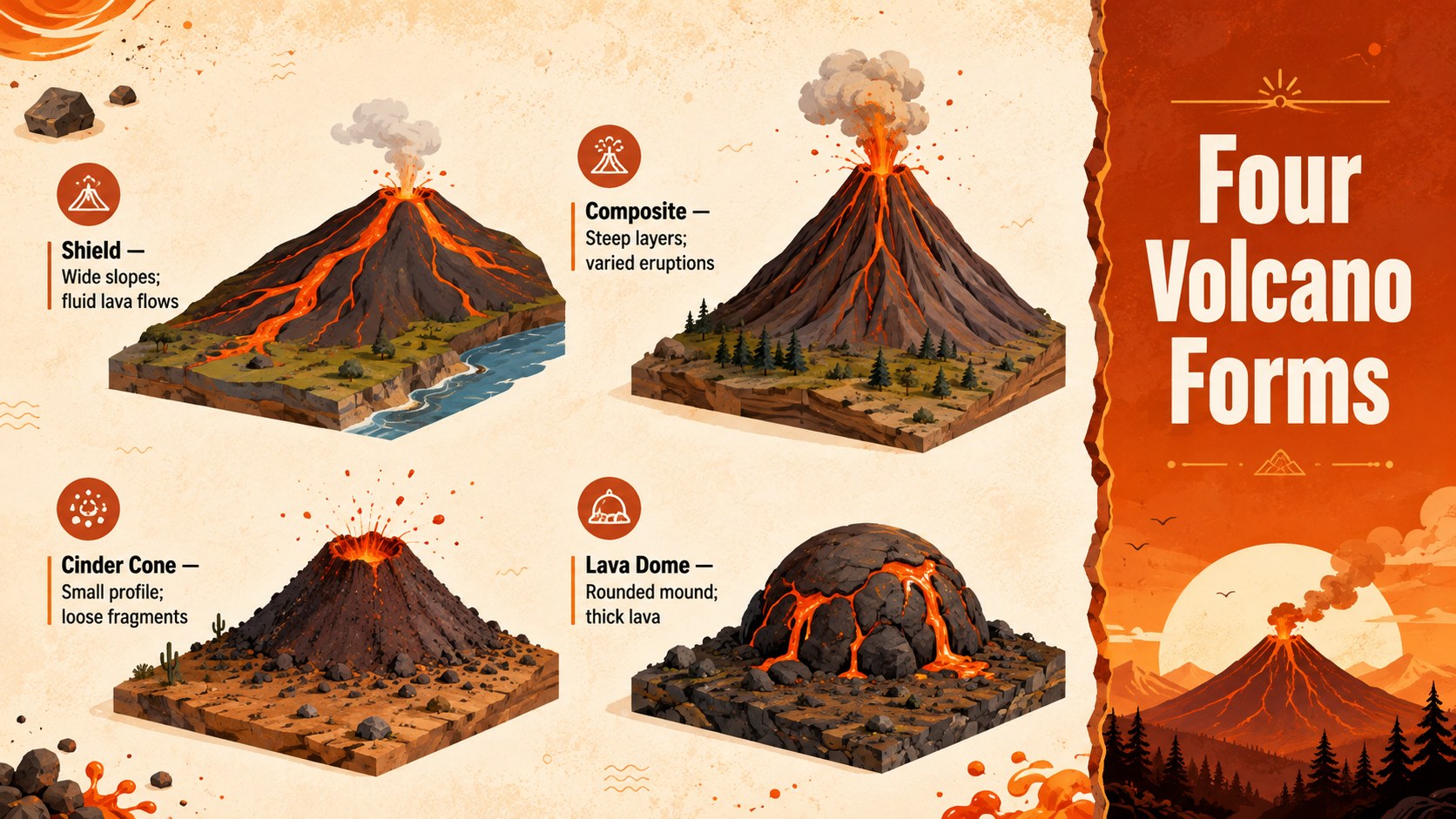
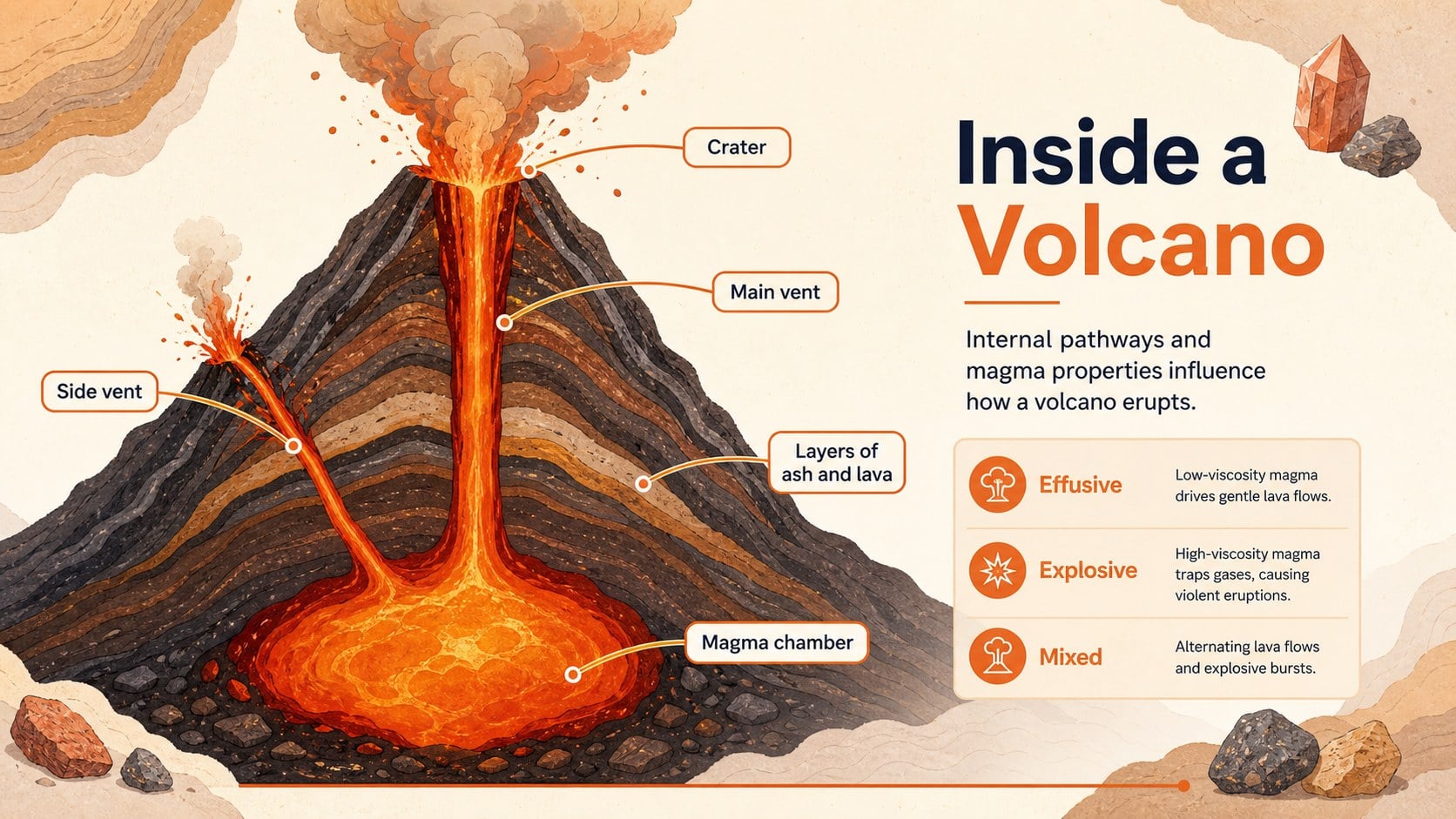
Inside, educators will find volcano classification slides for students covering shield, composite, cinder cone, and lava dome volcanoes. Comparison layouts connect each form with its profile, common materials, and typical eruption style. A labeled cross-section adds context for features such as the magma chamber, main vent, crater, and layers of ash and lava. Together, these pages create an earth science volcano diagram presentation that supports explanation, discussion, and visual review.
The template works especially well for upper elementary and middle school teachers, homeschool instructors, science tutors, and museum education teams. Adapt the shield composite and cinder cone lesson with local examples, vocabulary prompts, review questions, or student observations. Every page can be edited in PowerPoint or Google Slides, including headings, colors, diagrams, labels, and supporting text. The warm orange palette and friendly illustrated style keep the subject approachable while leaving enough space for accurate scientific content and classroom-specific learning goals.
Perfect for: middle school earth science lesson; volcano classification review; science fair preparation; homeschool geology unit; museum education workshop.
Frequently asked questions
Can I edit the volcano diagrams and labels? Yes. Headings, labels, text boxes, colors, and diagram elements can be adjusted to match your curriculum. You can also add regional volcano examples or replace terminology for a different grade level.
Practical details
Yes. Headings, labels, text boxes, colors, and diagram elements can be adjusted to match your curriculum. You can also add regional volcano examples or replace terminology for a different grade level.
Yes, the presentation is designed for both PowerPoint and Google Slides. Minor font or animation differences may appear when moving between platforms, so review the final deck before presenting.
The visual explanations are best suited to upper elementary and middle school learners. Teachers can simplify the labels for younger students or add more detailed geology notes for advanced classes.
Yes. Replace the accent and background colors with your school colors or a unit-specific palette while preserving strong text contrast. Illustration colors can also be adjusted for consistency.
Keep exploring
15Build an engaging World UFO Day session with this flying saucer history lesson deck, featuring retro green-and-brown slides for PowerPoint and Google Slides.
 15
15Plan a lively animal-learning journey with this jungle zoo adventure lesson deck, ready to customize in PowerPoint and Google Slides for young learners.
 16
16Turn environmental research into a clear story with a Watercolor Ecology Presentation Theme for PowerPoint and Google Slides in calming green and blue.
 16
16Build focused fashion, literature, and humanities presentations with the Red Triangle Editorial Theme, editable in PowerPoint and Google Slides.
 15
15Turn streaming stats, favorite tracks, and concert highlights into a bold annual listening recap slide deck for PowerPoint and Google Slides.
 15
15Turn highlights, milestones, and favorite moments into a colorful year in review slide deck with bold 3D graphics for PowerPoint and Google Slides.
 3
3Build a credible endorsement with Standout Colleague Recommendation Letter Slides, featuring colorful prompts for skills, achievements, and team impact.
 4
4Build clear beginner sessions with an ice hockey fundamentals training deck for coaches, PE teachers, and clubs, ready for PowerPoint and Google Slides.