
 15
15presentation
Indie Magazine Startup Pitch Deck
Shape your publishing concept with an indie magazine startup pitch deck featuring pastel gradients, bold collage layouts, and editable planning slides.
Google SlidesPowerPoint
presentation · English
Build a clear service model with Support Platform UML Architecture Slides, editable in PowerPoint and Google Slides for technical reviews and team planning.

Design notes
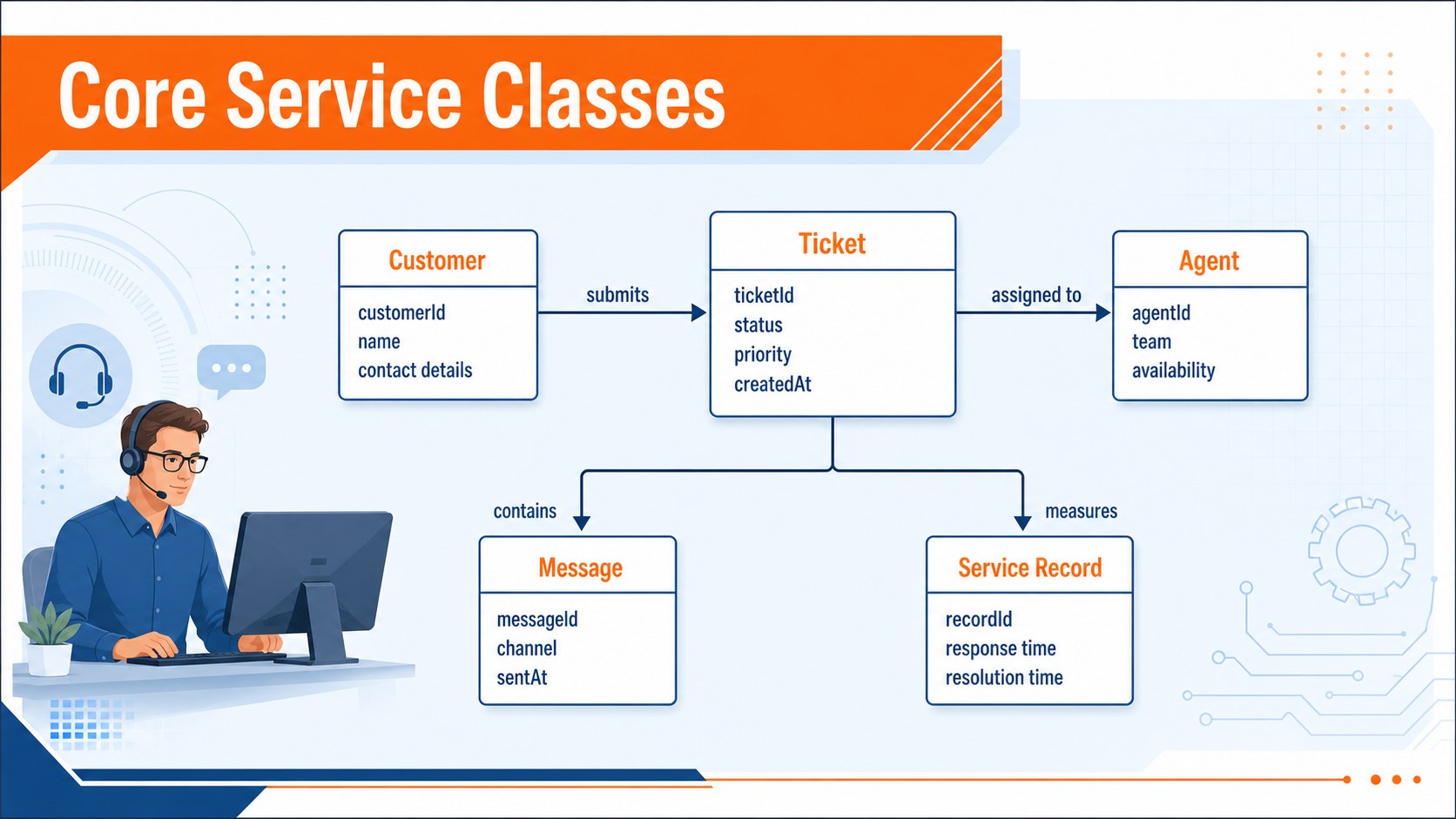
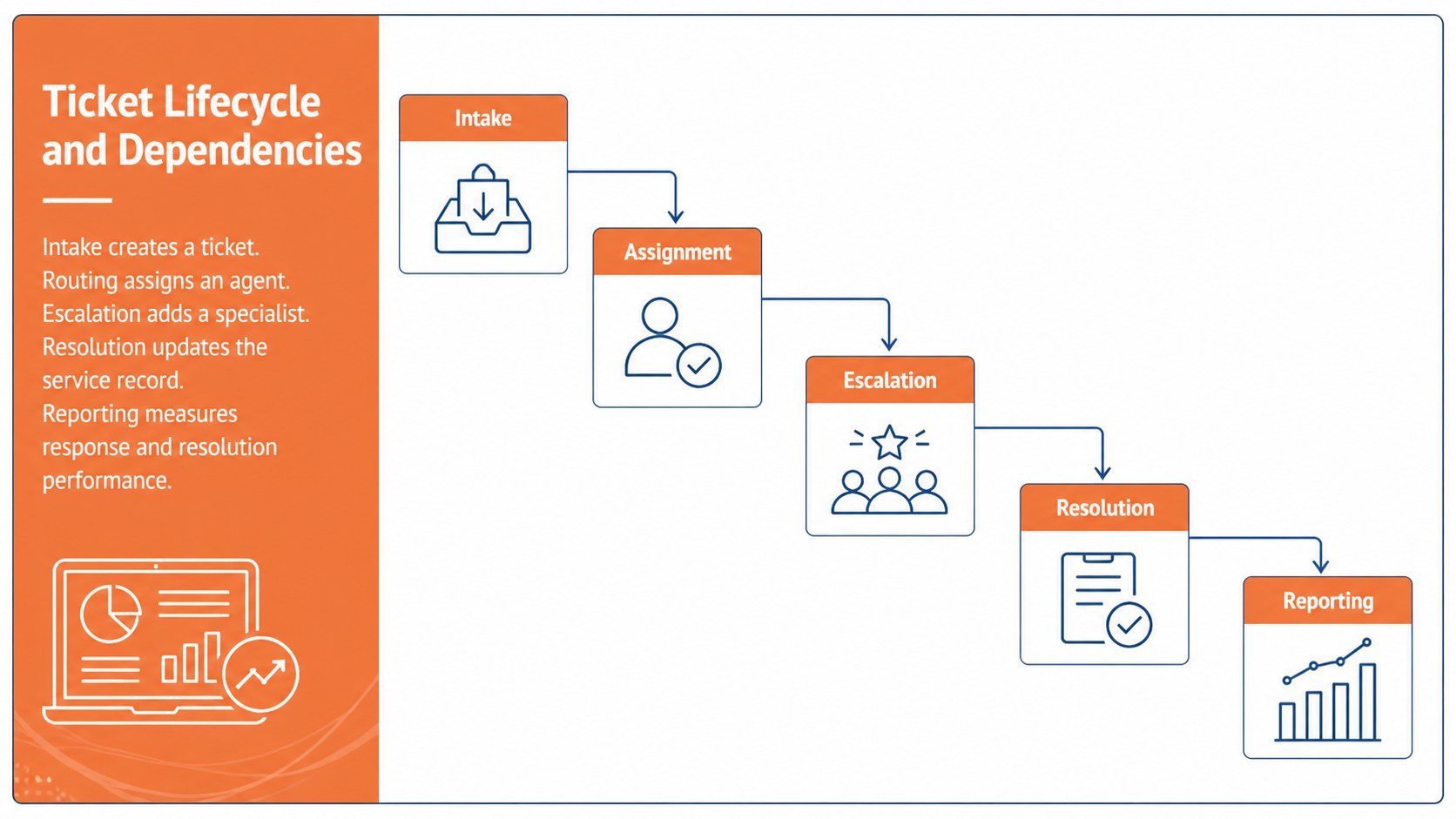
Support Platform UML Architecture Slides provide a structured way to explain how agents, customers, tickets, messages, and service records connect within a support environment. Designed in a professional orange, white, and blue visual style, this deck turns a complex customer service software architecture into a model that teams can inspect and discuss with confidence.
The three-slide layout includes an architecture overview, a detailed help desk UML diagram template, and a support ticket class model with clearly labeled entities, attributes, methods, and relationships. Editable connectors, text blocks, shapes, and color-coded groupings make it easy to adapt the diagrams to your own platform. You can document ticket assignment rules, communication channels, escalation paths, user roles, service-level tracking, and reporting dependencies without rebuilding the visual system from scratch.
These Support Platform UML Architecture Slides are suited to software engineers, solution architects, IT project managers, product teams, business analysts, and educators. Use them during system design workshops, technical onboarding, stakeholder reviews, requirements validation, or software architecture lessons. Every slide is formatted for 16:9 presentations and can be customized in PowerPoint or Google Slides. Replace sample terminology, reorganize classes, add application-specific relationships, and apply your organization’s typography while preserving a clear, presentation-ready hierarchy.
Perfect for: support system design workshop; software architecture review; help desk platform onboarding; technical requirements presentation; UML classroom lesson.
Frequently asked questions
Can I edit the UML classes and relationships? Yes. The class names, attributes, methods, connectors, labels, and color groups are editable, so you can match the diagram to your own support platform.
Practical details
Yes. The class names, attributes, methods, connectors, labels, and color groups are editable, so you can match the diagram to your own support platform.
The template is designed for PowerPoint and Google Slides. Both platforms allow you to update the text, move diagram elements, adjust colors, and present the deck in a 16:9 format.
Yes. Replace the fonts, accent colors, terminology, and footer details with your organization’s standards while retaining the diagram structure.
Yes. The overview slide introduces the system at a high level, while the detailed diagrams support deeper technical discussion. You can hide attributes or methods to create a simpler stakeholder-facing version.
Keep exploring
15Shape your publishing concept with an indie magazine startup pitch deck featuring pastel gradients, bold collage layouts, and editable planning slides.
 16
16Build clear project stories with the Icon Grid Teamwork Theme, a flexible blue illustrated deck for proposals, strategy updates, and team meetings.
 3
3Turn priorities into an actionable plan with an annual goals roadmap infographic, featuring editable orange and teal layouts for PowerPoint and Google Slides.
 15
15Create an Annual Achievement Report Presentation with colorful geometric layouts for milestones, results, lessons, and priorities in PowerPoint or Google Slides.