
 15
15presentation
College Essay Thesis Builder Slides
Build stronger academic arguments with a college essay thesis builder featuring guided examples, revision prompts, and editable PowerPoint and Google Slides.
Google SlidesPowerPoint
presentation · English
Build a memorable science or technology class with a playful robotics lesson deck featuring colorful layouts, friendly 3D machines, and editable visuals.








Design notes
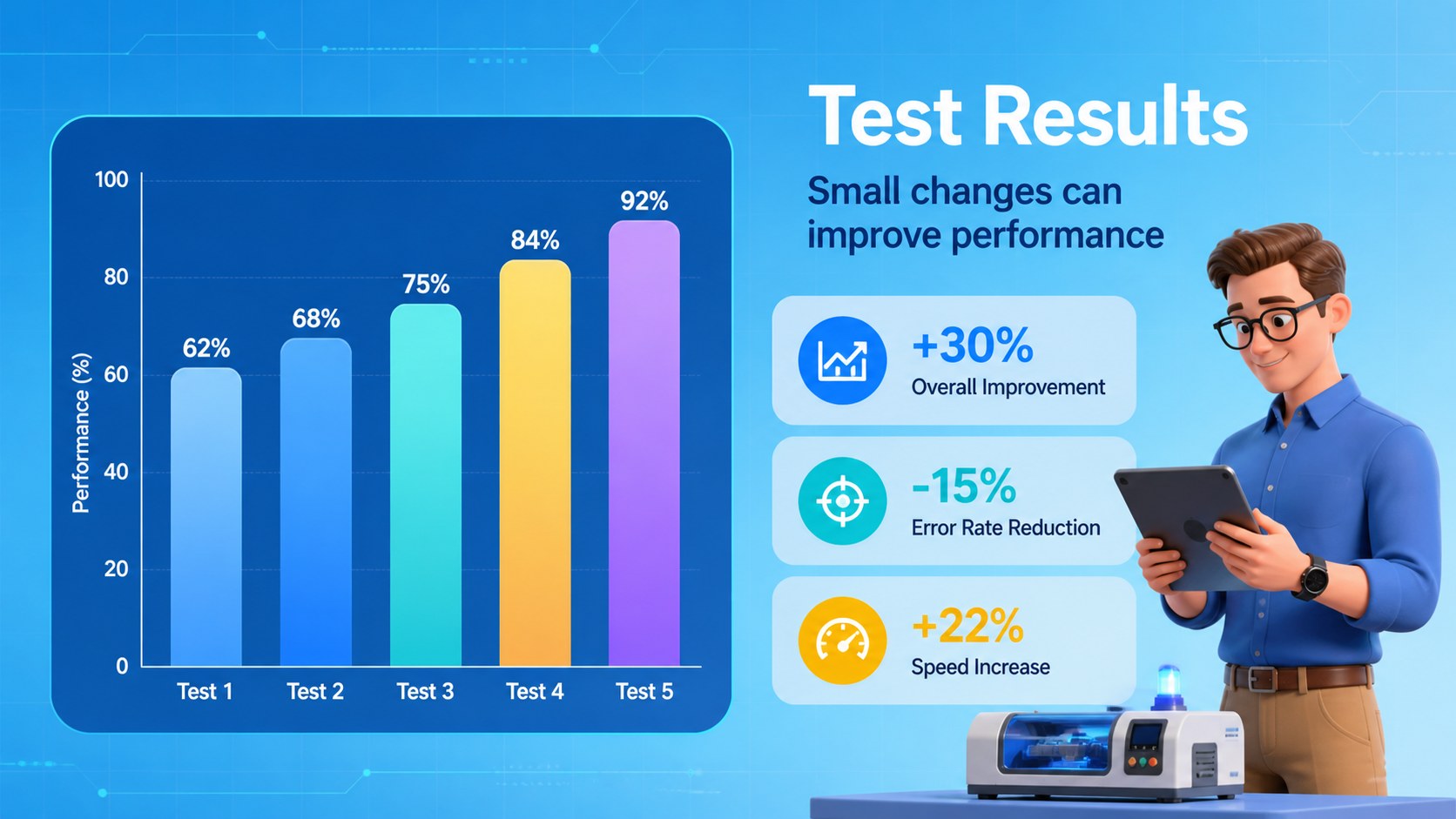
Make technology lessons more approachable with a playful robotics lesson deck designed for classrooms, workshops, and lively science talks. Colorful backgrounds, expressive 3D machines, and flexible layouts give technical subjects a friendly visual language without making the information feel crowded.
Inside, you will find 16:9 slides for an opening lesson, agenda, concept explanations, process diagrams, comparison tables, data highlights, timelines, activity instructions, and a clear closing summary. The structure works well for introducing robotics basics, explaining a simple engineering challenge, presenting a science fair project, or guiding students through a technology workshop. Charts, maps, tables, diagrams, and 80 editable icons help you turn research into easy-to-follow visual content.
Every element can be adjusted in Microsoft PowerPoint or Google Slides. Replace the sample copy, recolor the blue-led palette, edit the illustrations, and adapt the layouts for different age groups or presentation lengths. The deck uses Bebas Neue and IBM Plex Sans, includes widescreen formatting, and is suitable for teachers, STEM educators, student presenters, science communicators, and technology teams looking for an engaging classroom technology presentation.
Perfect for: robotics classroom lesson; science fair project; STEM workshop; engineering challenge briefing; technology team talk.
Frequently asked questions
Can I edit this deck in PowerPoint? Yes. The presentation is designed for Microsoft PowerPoint and uses editable text, colors, illustrations, charts, and icons. You can replace the sample content while keeping the overall visual system.
Practical details
Yes. The presentation is designed for Microsoft PowerPoint and uses editable text, colors, illustrations, charts, and icons. You can replace the sample content while keeping the overall visual system.
Yes, the layout is suitable for Google Slides in a 16:9 widescreen format. After importing it, review fonts and illustration placement before presenting.
Yes. You can recolor many design elements, change the text, resize icons, and adapt the visual emphasis for your audience. The blue and multicolor palette can be adjusted to match a class, project, or organization.
It is a practical choice for teachers, STEM educators, students, science communicators, and workshop leaders. Use it for robotics introductions, engineering activities, science fairs, or technology demonstrations.
Keep exploring
15Build stronger academic arguments with a college essay thesis builder featuring guided examples, revision prompts, and editable PowerPoint and Google Slides.
 15
15Build an engaging World UFO Day session with this flying saucer history lesson deck, featuring retro green-and-brown slides for PowerPoint and Google Slides.
 14
14Plan a memorable Lunar New Year campaign with the 2036 Dragon Year Celebration Theme, featuring bold red-and-yellow slides for lessons and events.
 15
15Build a thoughtful classroom discussion with this interfaith awareness lesson deck, featuring editable blue-and-white slides for PowerPoint and Google Slides.
 15
15Use this environmental awareness lesson deck to teach climate action through illustrated activities, discussion prompts, and ready-to-edit visuals.
 15
15Build playful lessons and party stories with a kid-friendly zombie celebration theme in purple, green and pastel blue for PowerPoint and Google Slides.
 15
15Build eerie lessons, campaigns, and story pitches with an undead survival scenario theme featuring editable slides for PowerPoint and Google Slides.
 16
16Turn environmental research into a clear story with a Watercolor Ecology Presentation Theme for PowerPoint and Google Slides in calming green and blue.